PrestaShop one page checkout in 2026: the native 9.2 module vs Supercheckout, One Page Checkout PS and Prime OPC
PrestaShop 9.2 now ships its own one page checkout. How it compares with One Page Supercheckout, One Page Checkout PS and Prime OPC on versions, themes, guest checkout, fields and price.
In short
- PrestaShop 9.2 (released 30 September 2026) includes a native one page checkout module,
ps_onepagecheckout. It is free, off by default and enabled under Design > Checkout. - The native module works out of the box only with Hummingbird-based themes. Classic themes need template overrides, and the PrestaShop team released it as a beta.
- On PrestaShop 1.7 and 8, or on a Classic-based theme, a one page checkout still means a module: One Page Supercheckout, One Page Checkout PS or Prime OPC.
- In our test of the native checkout on PrestaShop 9.2 with Hummingbird, delivery and payment stayed hidden until the customer entered an email address, and the form opened with four consent checkboxes and the standard PrestaShop address form.
- Choose by your shop, not by the feature count: PrestaShop version, theme, how many carrier and payment modules you run, and whether you need business invoice fields.
PrestaShop’s standard checkout has four steps: personal information, addresses, shipping method and payment. A one page checkout, also called a one step, quick or express checkout (OPC), puts them on a single page. For years the only way to get one was a module. Since PrestaShop 9.2 that is no longer true, so the question “which one page checkout should I use?” has a new first answer.
We make one of the modules compared here, Prime OPC. We have tried to describe the others fairly, using their vendors’ own pages. Prices and versions were checked on 26 October 2026 and will change; follow the links for current details.
The native one page checkout in PrestaShop 9.2
PrestaShop 9.2 became available on 30 September 2026. It bundles a native one page checkout module, ps_onepagecheckout. According to the PrestaShop team’s introduction:
- Contact, delivery, carrier and payment are on one page and update with AJAX, without page reloads.
- A guest starts with only an email address; the other sections unlock as they are filled in.
- Login and account creation move to separate PrestaShop pages.
- It is enabled under Design > Checkout by choosing the one-page layout, and can be switched back to the four-page checkout on the same screen. In multistore, each shop can use a different layout.
- It works out of the box with Hummingbird-based themes. Classic themes are not supported by default and may need template overrides.
Two cautions. The PrestaShop team released it as a beta and asks for feedback, and the module’s own package page still describes it as under heavy development. It also needs PrestaShop 9.2 and PHP 8.1 or later, so it does nothing for shops on 1.7 or 8.
We tested the native checkout
On 27 October 2026 we switched on the native one page checkout on a test shop with PrestaShop 9.2, the Hummingbird theme and default settings, added products to the cart and opened the checkout as a new guest. This is what we saw.
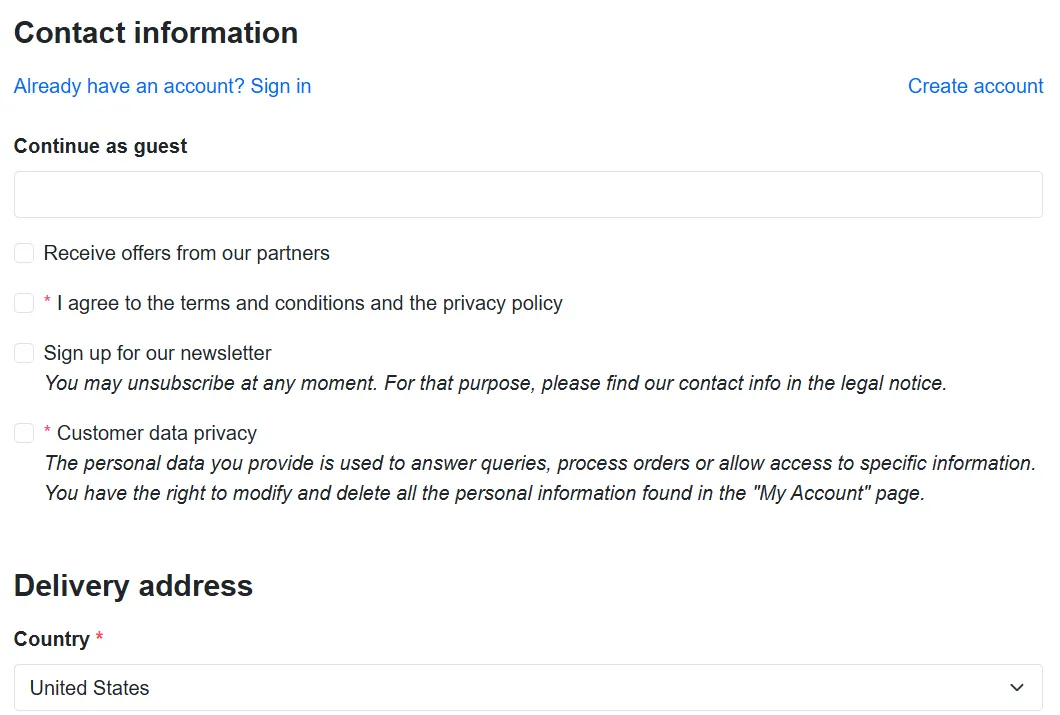
- The page starts with consents. Under the email field there were four checkboxes before the delivery address: offers from partners, terms and privacy policy, newsletter and customer data privacy. Which ones appear depends on the modules and settings of each shop.
- Login and account creation are links. Already have an account? Sign in and Create account lead to separate PrestaShop pages.
- The address form is the standard PrestaShop form, with fields such as Alias, Address Complement and State.
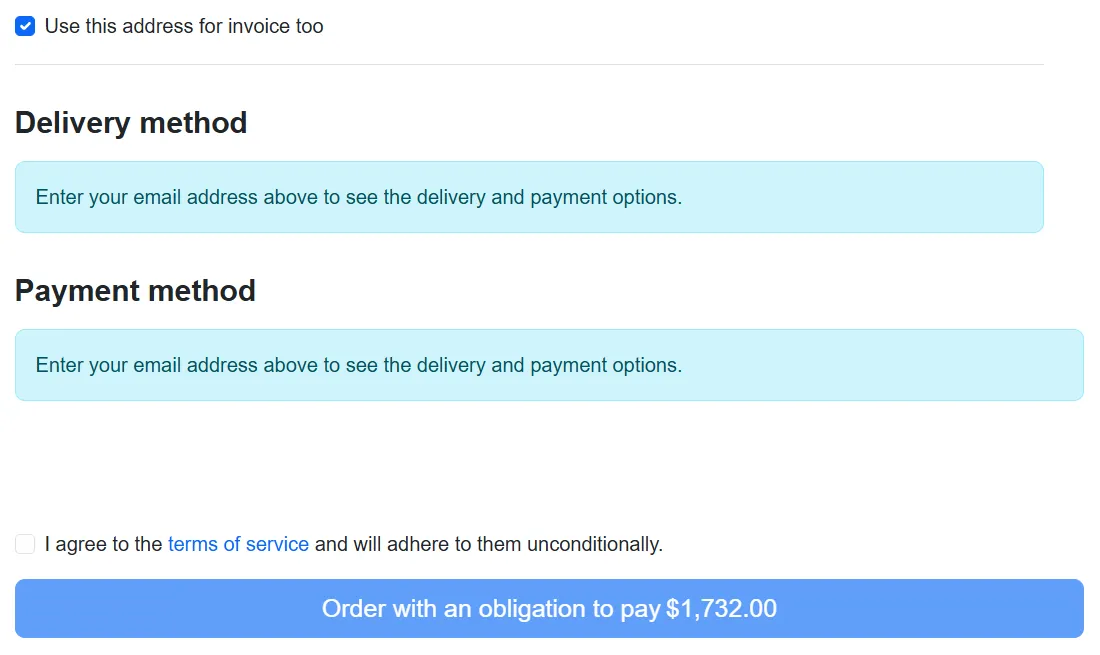
- Delivery and payment stay hidden until the email is entered. Both sections showed Enter your email address above to see the delivery and payment options, so the customer cannot see shipping options or costs before giving an email address.
- There is a second terms checkbox above the order button (I agree to the terms of service…), in addition to the one under the email field.
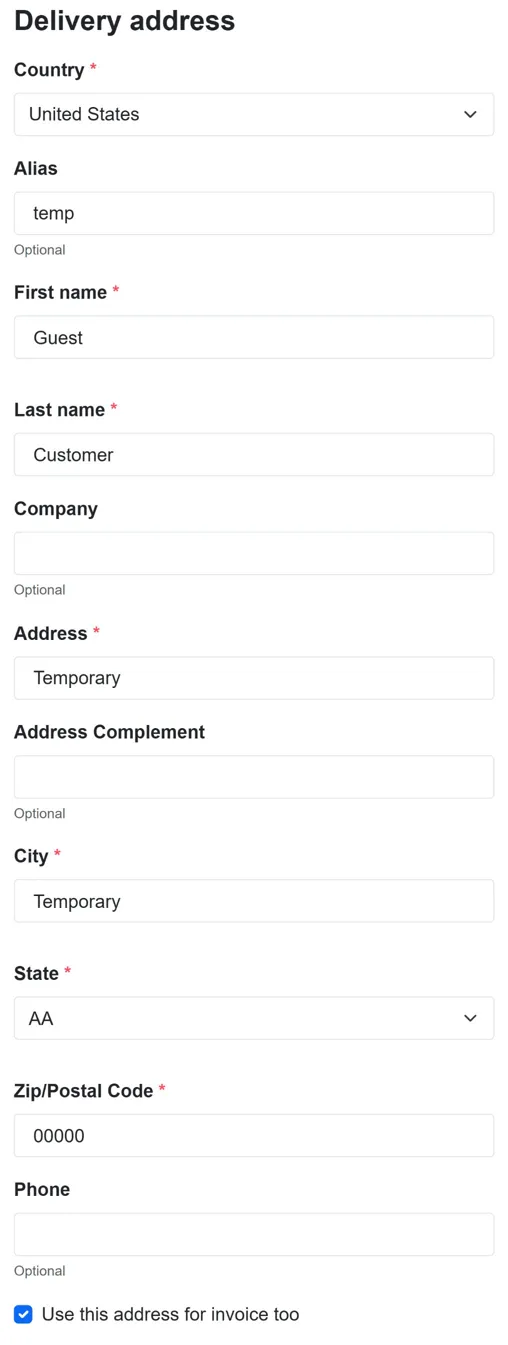
- On a phone, the address fields were already filled with placeholder values: Alias temp, name Guest Customer, address and city Temporary, postal code 00000. The PrestaShop team writes that the module registers customer data in the background to keep abandoned cart recovery working, which may explain them. The customer has to replace them by hand.
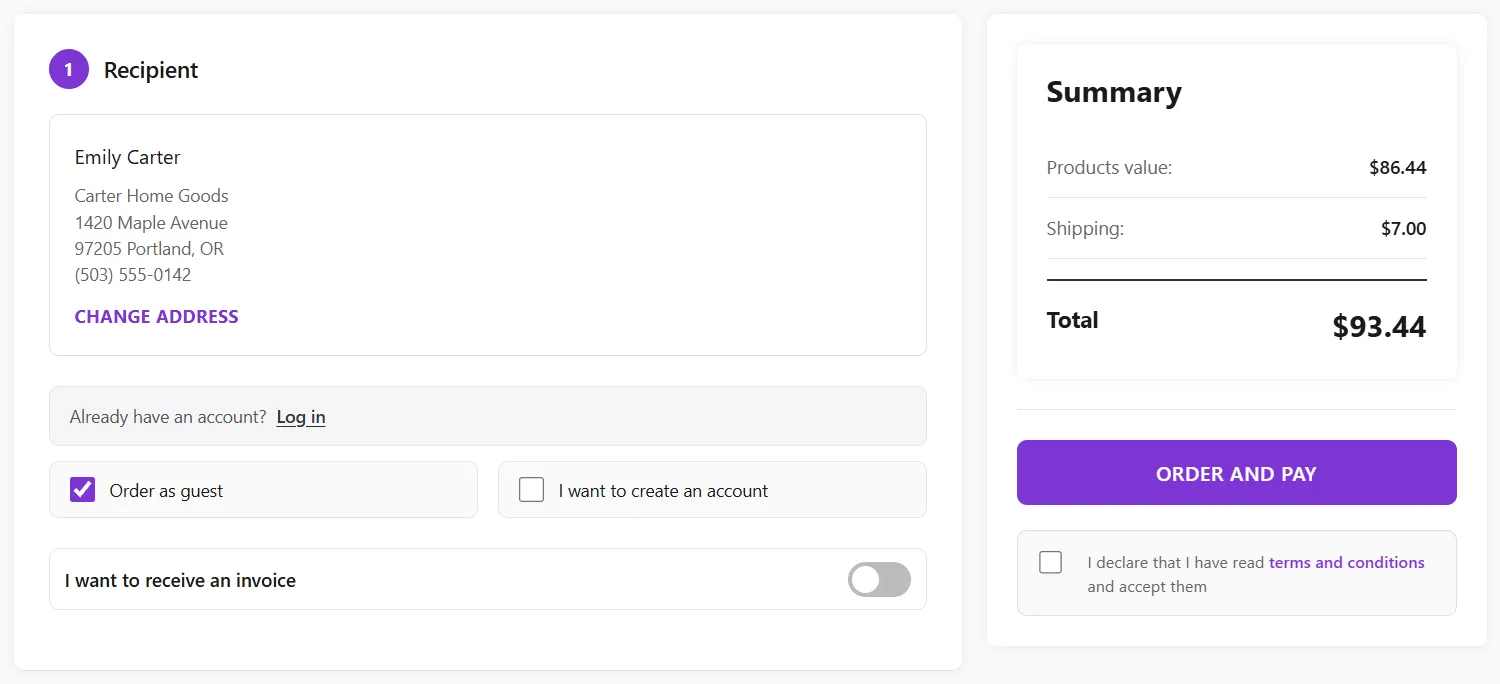
For comparison, this is the same step in Prime OPC: recipient, guest or account choice, invoice switch and the order summary with the total and the order button in one view, with carriers and payment methods on the same page.
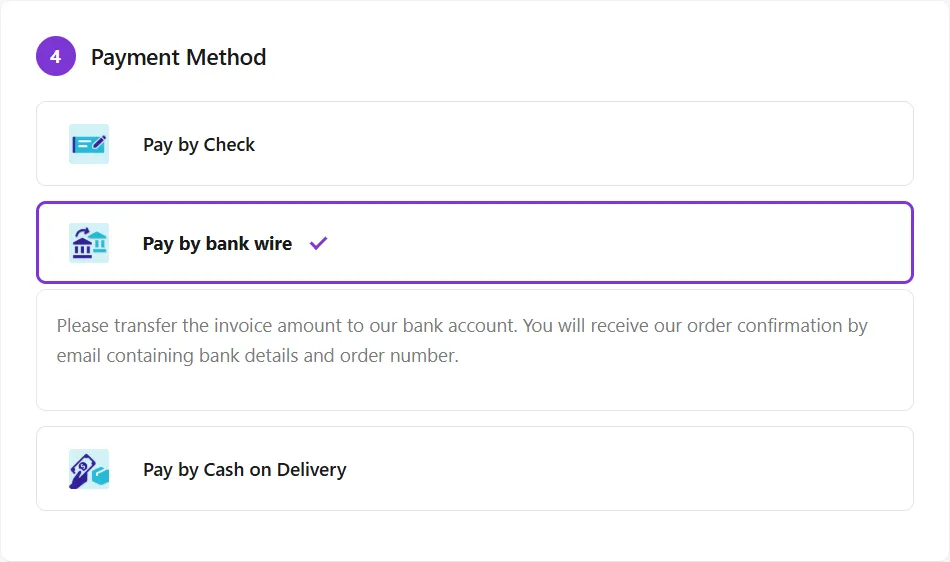
The native module is a beta, so some of this may change in later versions. We will update this section when it does.
Modules that add a one page checkout
For shops that are not on 9.2 with a Hummingbird theme, these are three of the modules available. The facts come from each vendor’s page:
- One Page Supercheckout by Knowband. Vendor page. Compatible with PrestaShop 1.6 to 9.x. Its strengths are configuration: one, two or three columns, drag-and-drop fields, social login with Facebook and Google, newsletter integrations, a free shipping progress bar and payment methods mapped to shipping methods.
- One Page Checkout PS by PresTeamShop. Vendor page. Requires PrestaShop 1.7.6 or later, with changelog notes on PrestaShop 8.1 and the Hummingbird theme. It lets you add, remove, rename and reorder registration fields, validates Spanish, Chilean and Portuguese ID numbers, and offers social login.
- Prime OPC by VibeModules (ours). Module page. For PrestaShop 1.7.8 to 9.2, on Classic and Hummingbird themes. Fewer settings by design: guest checkout by default, an invoice switch with company name, Tax ID and a VIES check of EU VAT numbers, address fields that fit the delivery country, a free shipping threshold, and two optional reloads for carrier modules that need them.
Side by side
| Native (PrestaShop 9.2) | One Page Supercheckout | One Page Checkout PS | Prime OPC | |
|---|---|---|---|---|
| PrestaShop versions | 9.2 and later | 1.6 to 9.x | 1.7.6 and later | 1.7.8 to 9.2 |
| Latest version listed | 0.6.7, September 2026 | 9.0.8, April 2026 | 4.3.1, December 2024 | 1.3.5, October 2026 |
| Price listed | Free, bundled | $79.99 list, $63.99 on sale, on the vendor site | Not shown on the vendor page | €97.99 excl. VAT on PrestaShop Addons, with the first year of support and updates |
| Themes | Hummingbird out of the box; Classic needs overrides | Not stated | Hummingbird support noted in the changelog | Classic and Hummingbird |
| Guest checkout | Yes, email first | Yes; optional automatic account creation | Yes | Yes, by default |
| Account creation | On separate PrestaShop pages | In the checkout, plus social login | In the checkout, plus social login | In the checkout, only if the customer asks |
| Editing checkout fields | Not stated | Drag and drop, custom fields | Add, remove, rename, reorder | Fixed fields that adapt per country |
| Business invoices | Not stated | Customer profiles such as Business | ID validation (ES, CL, PT) | Company, Tax ID, VIES check of EU VAT numbers |
| Free shipping progress | Not stated | Yes | Yes | Yes |
“Not stated” means we did not find it on the vendor’s page, not that the feature is missing. Ask the vendor before you buy.
How to choose
- Start with your PrestaShop version. On 1.7 or 8, the native module is not an option yet. If you plan to move to 9.2 soon, check whether the module you buy supports it.
- Check your theme. On a Hummingbird-based theme with PrestaShop 9.2, try the native checkout first; it costs nothing. On a Classic-based theme, the native module needs template work, which is where a module usually saves time.
- List your carrier and payment modules. Pickup points, lockers, buy-now-pay-later and card payments are where one page checkouts fail, because their content has to be redrawn without a page load. We explain why in Pickup points in a PrestaShop one page checkout.
- Decide how much you want to configure. If you want to rearrange columns and fields yourself, a highly configurable module fits. If you want a checkout that works with few settings, choose a simpler one.
- Test on a copy of your shop. Place one order with every carrier and every payment method, as a guest and as a logged-in customer, on a phone and on a computer.
You can try Prime OPC on its demo shop before deciding.
Questions and answers
Does PrestaShop have a native one page checkout?
Yes, since PrestaShop 9.2. The bundled module ps_onepagecheckout puts contact, delivery, carrier and payment on one page. It is installed but not enabled; you switch it on under Design > Checkout by choosing the one-page layout.
Can I use the native one page checkout on PrestaShop 8 or 1.7?
No. The module requires PrestaShop 9.2.0 or later and PHP 8.1 or later. On earlier versions you need a one page checkout module.
Does the native one page checkout work with the Classic theme?
Not by default. PrestaShop says it works out of the box with Hummingbird-based themes, while Classic themes may need some of the module’s templates overridden.
Will a one page checkout break my carrier or payment modules?
It can. In a one-page flow the delivery and payment sections are refreshed without a page load, so modules that inject content there must re-render after each refresh. PrestaShop asks module developers to test their modules in the new flow. Test every carrier and payment method before going live.
Which one page checkout module is best for PrestaShop?
There is no single best one. On PrestaShop 9.2 with Hummingbird, try the native module first. On 1.7, 8 or a Classic theme, compare the modules in the table above on your version, your theme and the carrier and payment modules you use, and test each one on a copy of your shop.